
FAQ & Troubleshooting
Find the answer. Follow the steps.
Our original customer questions, detailed troubleshooting and Mac instructions — in one place.
Trial KeyWhat is the trial key?
The trial key is a license key that resets your printer's waste tank counter to a reduced counter value (depending on model and utility version) once.
Trial KeyWhy doesn't the trial key work?
The trial key can only be used once per printer and is then locked.
Furthermore, the trial key can only be used if the printer is already in error. As long as the printer is still printing, the counter cannot be reset using the trial key.
Trial KeyHow do I use the trial key?
You can find a detailed description of how you can use the trial key here.
Licence & purchaseHow and where can I buy a WIC Reset Key?
You can buy a WIC Reset Key to reset your Epson printer's waste tank counter in a few simple steps on this website.
Step 1: Add the reset key to the shopping cart
Step 2: Check your shopping cart and continue by clicking “Checkout”.
Step 3: Fill out the order form and confirm the terms and conditions, data protection declaration and cancellation policy.
Step 4: Complete the order by making payment via PayPal, bank transfer or credit card.
Licence & purchaseWhat happens if I purchased a WIC Reset Key?
Your licence is emailed after payment is confirmed. Your invoice is also provided by email. With bank transfer, completing the order alone does not confirm payment.
Licence & purchaseI have not received my WIC Reset Key. What to do?
If you have ordered a WIC Reset Key from us and cannot find it in your email inbox, please check the spam folder in your email inbox. In rare cases, the dispatch of the reset key is delayed for technical reasons.
If the reset key is not in your spam folder and you still haven't received an email after 24 hours, please contact us at info@druckerreset.de.
DownloadWhere can I download the WIC Reset Utility?
You can download the WIC Reset Utility here.
Licence & purchaseCan I use the WIC Reset Key multiple times?
No, you can only use the WIC Reset Key once to reset your printer.
If you want to reset your printer again, you will need to purchase a new key.
Licence & purchaseI purchased two WIC reset keys. Can I use this to reset different printers?
Sure, of course! You can find a list of all supported printers here.
Licence & purchaseDoes the WIC Reset Key have an expiration date?
No, you can use the WIC Reset Key whenever you want.
SecurityMy antivirus program warns about the WIC Reset Utility. What to do?
Use only the official download links. Check the exact alert and scan the file with current security software. A warning alone is not proof of a false positive. Do not disable your antivirus or firewall across the system; contact us with the exact message if unsure.
TroubleshootingMy WIC Reset Key is not working. What to do?
- Cancel queued print jobs and restart the printer and computer.
- Use a direct USB connection. Try another USB port and cable; select the USB printer entry in WIC.
- Check your internet connection: the utility needs to verify the key online.
- Copy the unused key without additional spaces. Confirm the exact model supports Reset Waste and uses this key type.
- Install the current Epson driver for your model and operating system if communication still fails.
- Note the exact error and contact us with your order number. Do not buy another key blindly.
macOSI'm using a Mac and can't open the software. What to do?
Open WIC Reset Utility on macOS
If macOS blocks the app because the developer cannot be verified, follow these steps only after checking that you downloaded it from the official source:
- Download the Mac version from the download links on this page. Open the DMG and follow its installation instructions.
- Try to open WIC Reset Utility once. Close the message that prevents it from opening.
- Open the Apple menu → System Settings → Privacy & Security.
- Scroll to the Security section. Next to the message about WIC, click Open Anyway.
- Confirm with your Mac password or Touch ID if requested, then confirm Open.
- Connect the printer directly by USB. In WIC, select the USB entry for your model and use Read waste counters first.
On older macOS versions, the pane may be called “Security & Privacy”. If “Open Anyway” is missing, attempt to open the app again and return to Settings. A managed Mac may require help from its administrator.
This procedure applies to an unidentified-developer warning. If macOS reports malware or a damaged app, do not override that warning; download a fresh copy from the official source and ask for help.
Apple’s explanation of these settings →
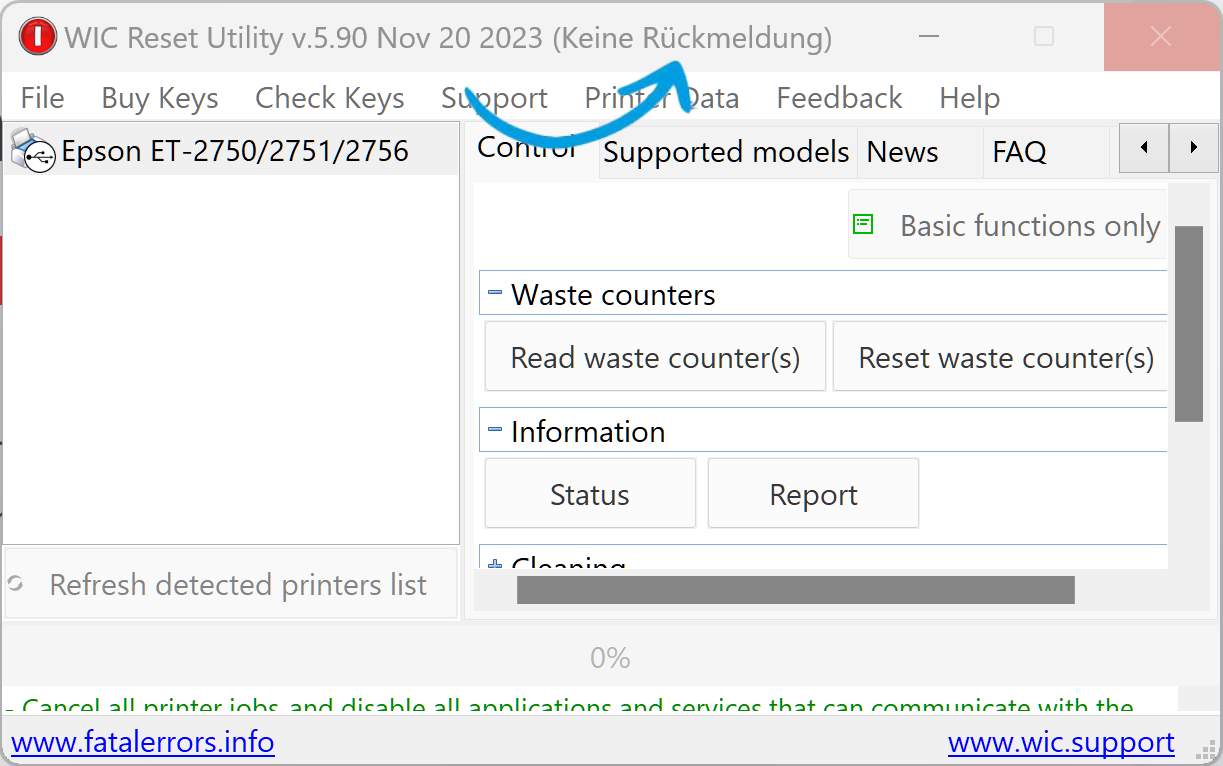
TroubleshootingThe WIC Reset software hangs. What to do?
Under certain circumstances it can happen that the software hangs and says “No response” in the window bar.
To solve this problem, you should install the latest driver for your printer.
TroubleshootingThe WIC Reset Utility reports a "Query Rejected" error. What to do?
Epson has integrated security updates into the latest printer software and the WIC Reset Utility can no longer access the printer over WiFi.
- Temporarily connect the printer using a USB cable and disable the printer's Wi-Fi connection.
- Then open the WIC Reset Utility
- Reset the printer using the license key as described on this website. This should now be possible via a USB connection.
- Restart the printer.
TroubleshootingMy printer from the ET-2800 series cannot be reset. What to do?
Printers from the ET-2800 series generally cannot be reset via Wi-Fi.
Therefore, please connect your printer via USB cable, disable the Wi-Fi connection if possible, and try again.
Make sure to select the printer with the USB symbol in the software, not the one with the Wi-Fi symbol.

TroubleshootingI/O Operation Error
“If the software displays an I/O communication error, such as ‘I/O service could not perform operation,’ please follow these steps:
- Connect your printer via USB cable and try again.
- If Step 1 does not resolve the issue, proceed as follows:
- Uninstall your printer driver.
- Restart your computer.
- Download the printer driver for your device from the official Epson website.
- Install the new printer driver.
- Start the WIC Reset software and try again. Make sure your printer is connected via USB cable.”
Licence & purchaseWhich key do PP-50, PP-50BD and PP-100 need?
These Discproducer models need the PP special key. The standard WIC Reset Key is not suitable. Use the model checker to open the correct product.